
ShotPost
Screenshot Mockups
ShotPost builds App Store screenshots and preview videos on the device that recorded them — no uploads, no desktop.


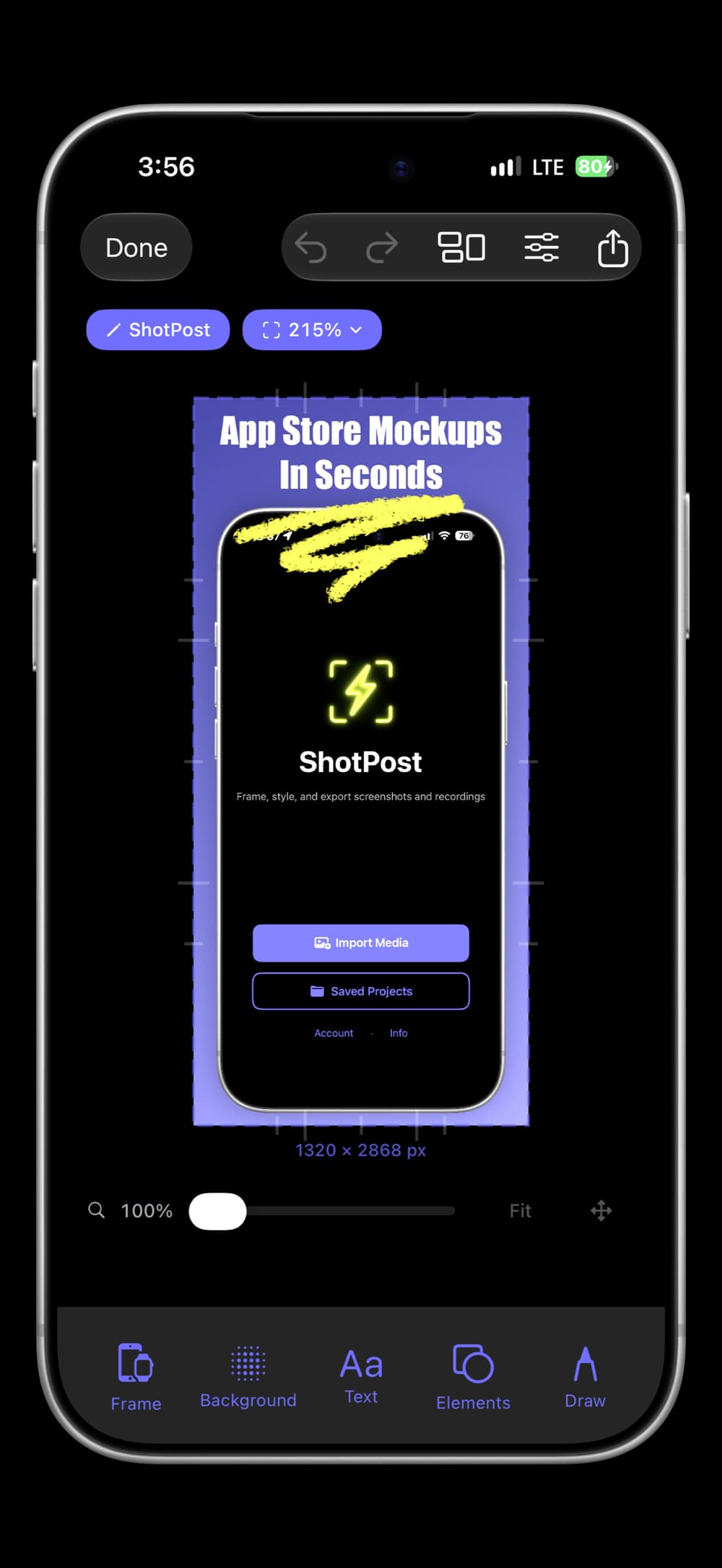
Import a screenshot or a screen recording, drop it into one of 140+ real device frames, and style it with smart gradient backgrounds, eyedropper color matching, text overlays, drawing tools, and privacy masks. Every frame rotates through portrait, landscape, and upside down, so a landscape screenshot or game recording sits in a landscape device.
Name your projects, search and filter your library, match a whole set to one look, and export to 50+ platform presets — from Instagram to upload-ready App Store preview videos that can close on an end card. All processing on-device, no account required.
iPhone
Features
Frames & canvas
140+ device frames
iPhone 18 Pro, iPhone Duo, iPad, and Apple Watch
Every frame rotates
Four ways, and turns itself to match landscape imports
Apple Watch
All 76 case and band pairings
Zoom to 4x
Pan for fine work, or jump to a preset
Style
Smart backgrounds
9 gradients from your own screenshot
Eyedropper
Any pixel’s color, with your last 8 kept
Match Style
Copy another project’s background, frame, or text style
Brightness
Lift dark-mode shots without washing out blacks
Swap media
Replace the media and keep the styling
Text & annotation
20 curated fonts
Or search the rest on your iPhone
Full text styling
Weight, italic, underline, outline, and spacing
Drawing tools
Neon, highlighter, and crayon, with line smoothing
SF Symbols
Thousands, searchable by name or meaning
App Store badge
In all 39 languages Apple publishes
Privacy masks
Blur, pixelate, solid redaction, or Spotlight
Video (Pro)
Screen recordings
Frames, text, and backgrounds work on video too
App Store previews
Duration, frame rate, and encoding handled for you
End cards
Icon, name, and badge, held 2 to 5 seconds
Live preview
Play, pause, and scrub through to the end card
Organize & export
Projects and filters
By name, format, device, orientation, and type
Duplicates
Find identical projects and merge them in a tap
Batch tools
Rename, export, duplicate, match, or delete many (Pro)
50+ export presets
From Instagram to every App Store size
iCloud backup
Private and automatic, for your whole library
Pricing
Free
5 exports per month, with no watermark on any of them
Pro — $7.99/mo, $49.99/yr, or $99.99 lifetime
Unlimited exports, video and App Store previews, batch tools (7-day trial on both subscriptions)
FAQ
What is ShotPost?+
ShotPost is a screenshot and video editor for iPhone that creates professional mockups for App Store listings and social media. Import screenshots or screen recordings, add device frames, customize backgrounds, and export at exact platform dimensions — all from your phone.
What platforms are supported?+
Over 50 platform presets with exact dimensions for Instagram, Facebook, X, LinkedIn, TikTok, YouTube, Threads, Pinterest, Snapchat, and the full App Store lineup — iPhone, iPad, and Apple Watch. Save and reuse named custom sizes for anything not on the preset list.
Can I end a video on an end card?+
Yes. Add an end card to any video and design it like a screenshot, with your app icon, name, and the App Store badge. Hold it for 2 to 5 seconds and fade it to black if you like; the recording’s sound fades out as the card arrives. The preview plays through to the card, so you see exactly how the export will end. Video export requires Pro.
Can I make a set of projects look alike?+
Yes, with Match Style. Pick a project you already like and choose what to take from it: its background, device frame, media styling, or text style. From the editor’s menu it restyles the project you have open. In Saved Projects, select several and match them all at once (Pro), with Undo offered for a few seconds afterward.
Can I make landscape mockups?+
Yes. Every device frame turns four ways — portrait, landscape left, upside down, and landscape right — and the screen geometry turns with it, so the artwork stays correct. Import a landscape screenshot or a game recording and ShotPost picks the matching orientation for you. Video behaves exactly like stills.
What device frames are available?+
Over 140 frames in every finish Apple publishes — iPhone 18 Pro and Pro Max, the iPhone Duo foldable in all three of its states, iPhone 17, 16, and Air, iPad Pro, Air, mini and iPad, and Apple Watch Ultra 3, Ultra 2, and Series 11 across all 76 case and band pairings. Current models show by default with previous generations one tap away, your recent frames sit at the top, and match badges flag the ones that fit your screenshot.
How do layers work?+
Text, drawings, photos, symbols, and masks share one stack. Every selected item has a layer button that moves it up one step, wrapping back to the bottom from the top, so you can stack a callout over a mask or tuck a symbol behind text. App Store badges always render on top, as Apple's badge guidelines require.
Can I hide private information in a screenshot?+
Yes, four ways. Blur, pixelate, and solid redaction cover an area, and Spotlight does the opposite — it dims everything except the part you want seen. Each one can be a rectangle, an ellipse, or a capsule, and you place and stretch it exactly where you need it. Imported photos take the same shape choice.
Can I match colors from my screenshot?+
Yes. Every color control has an eyedropper beside it — borders, backgrounds, gradients, text, brushes, badges, and photo elements. Tap it to open your screenshot full-screen, drag to move the magnifier over any pixel (the color and its hex value update as you go), then tap Use Color. It reads the true pixel color from your imported image, so accents can match your app's palette exactly. Your last 8 sampled colors stay one tap away, in every eyedropper and in the Draw panel.
How do smart backgrounds work?+
ShotPost analyzes your screenshot and generates nine gradient suggestions across different moods — vivid, muted, dark, light, warm, cool, and more — plus eight solid color suggestions pulled from your image. Cycle through gradient directions with one tap, or pick any photo as your color source and switch back whenever you like. Pin your favorites for quick access.
What editing tools are included?+
Text in 20 curated fonts, or search the rest on your iPhone, with weight, italic, underline, strikethrough, an outline, letter and line spacing, color, and alignment. Freehand drawing with neon, highlighter, and crayon brushes. Thousands of SF Symbols, searchable by name or meaning, with your recent picks one tap away. The App Store badge in all 39 languages Apple publishes. Brightness control for dark-mode screenshots. Blur, pixelate, solid redaction, and Spotlight for privacy. Full undo and redo.
Can I export with a transparent background?+
Yes. Set the background to transparent and export as PNG — ShotPost automatically suppresses the drop shadow so the edges composite cleanly into other designs. Transparent projects are tagged with a PNG filter chip in your library, so they're easy to find again.
How do I find a specific project?+
Name your projects and they'll appear in the gallery card, search results, and filter chips. Filter chips group projects by project, format, device and orientation, and type (Screenshot, Transparent, or Video), and the menus narrow each other so no combination comes up empty. A dedicated Duplicates filter surfaces projects with identical output so you can clean up your library in a tap.
How do I clean up duplicate projects?+
The Duplicates filter groups projects whose output is identical, whether you duplicated them or rebuilt the same design twice, and offers Merge to fold a group back into one project. You can also select several projects and tap Delete: a Keep Oldest / Keep Newest / Delete All alert lets you control what survives.
How does video support work?+
Import screen recordings and apply the same effects — device frames, text, backgrounds, and overlays all carry over. Preview the recording inside its frame, with play, pause, a scrubber, and sound, right through to its end card. Export an unchanged video again and it’s ready right away, even after you’ve closed the app. For App Store previews, ShotPost handles duration, frame rate, audio, and codec automatically; if a recording sits outside the 15-to-30-second window you can speed it up, loop it, or export it at its original length. Video processing requires Pro.
Can I manage multiple projects at once?+
Yes. With Pro, select multiple projects and use Batch Tools to rename, export, duplicate, or delete them all at once. A progress overlay shows exactly where you are, and you can cancel anytime.
Can I batch export videos?+
Not currently — batch export covers still images only. Video encoding is heavy enough that running several in parallel would freeze the app or run out of memory on most devices, so videos export one at a time. Batch duplicate and batch delete still work with video projects.
How much does it cost?+
ShotPost is free with 5 exports per month, and free exports carry no watermark. Pro unlocks unlimited exports, video processing, and batch tools. Monthly $7.99, Annual $49.99, or Lifetime $99.99. Both subscriptions include a free 7-day trial.
What is ShotPost Pro?+
ShotPost Pro unlocks unlimited exports, video import and export including App Store previews, and batch tools. Available as Monthly ($7.99), Annual ($49.99), or Lifetime ($99.99). Both subscriptions include a 7-day free trial. Every other feature is free, and free exports are never watermarked.
Do I need to create an account?+
No. Download and start creating immediately. No signup, no email, no password. Projects save to your device and back up privately to your iCloud account.
Is my data private?+
Completely. All processing happens on your device. Projects back up to your private iCloud account. No third-party servers, no tracking, no analytics. We never see your screenshots or mockups.
Where do my screen recordings live?+
Projects sync through your private iCloud account, and the recordings themselves sit in iCloud Drive alongside them. Open a project whose recording isn’t on this device yet and ShotPost downloads it, showing its progress while you wait. If a recording was saved while iCloud was off, or your iCloud storage is full, it stays on the device that made it — and the editor tells you which case you’re in instead of just reporting the video as missing.
Does it work offline?+
Yes. Create and edit anytime without an internet connection. When you reconnect, projects back up automatically to iCloud.
Is ShotPost accessible?+
Yes. ShotPost supports VoiceOver with labels on interactive controls, respects Reduce Motion to skip animations for users with vestibular sensitivity, and uses icons alongside color to signal tappable elements and quota states — so interactivity doesn't depend on color alone. Dark Interface is fully supported throughout the app.
Guides
Version 1.11.0