
Epiqara
Photo to Video Maker
Epiqara turns the photos in your camera roll into a polished, shareable memory video — a photo slideshow — in seconds.


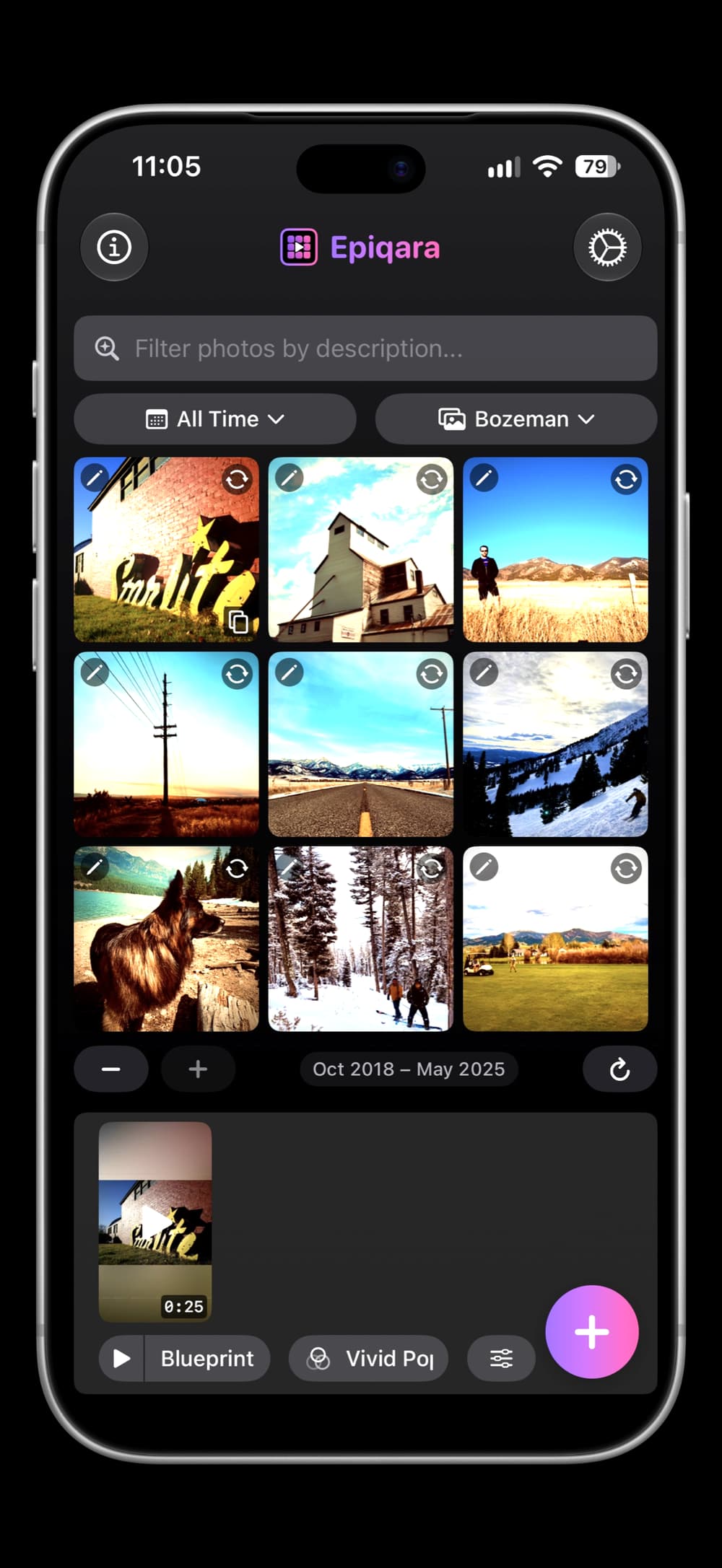
Pick your moments — or find them with natural-language photo search — drag to arrange them in any order, turn any photo into a title card, choose a look and a pace, and Epiqara assembles a shareable video with cinematic effects and signature filters.
Re-edit any video anytime and share straight to your favorite apps. Free to start, no account required.
iPhone
Features
Smart Features (AI)
Smart Music
254 songs across twelve moods, matched to your photos
Smart Captions
Ready-to-post captions and hashtags
Photo Text
AI-suggested labels that fit each photo
Smart Filters
Filter picks ranked for your photos
Photo cards
Title cards
Any photo, with your text on top
Blur, Dim, or Color
Choose how the photo sits behind the title
Colors from the photo
Solid or gradient, plus black and white
Free and on-device
No AI and no network involved
Pacing styles
Rapid
2 seconds per photo
Dynamic
2.5 seconds per photo
Classic
3.5 seconds per photo
Epic
5 seconds per photo
More
24 signature filters
From vintage film to modern cinematic grades
Favorites
Music and filters you reuse sort to the front
Natural-language search
Find photos by describing them
Drag to reorder
Your order is the video’s order
Re-edit anytime
Every video keeps its photos and settings
Cinematic effects
- VHS Recording
- Film Reel
- TV Static
- Digital Glitch
- Soft Lights
Pricing
Free
5 exports per month
Lifetime — $9.99 one-time
Unlimited exports; Family Sharing for up to 5
Share to
FAQ
What is Epiqara?+
Epiqara turns your photo library into share-ready vertical videos in seconds. AI picks the soundtrack, filters, captions, hashtags, and on-photo overlay text — your photos never leave your device — the AI receives a text description of them, never the images.
Can I search for specific photos?+
Yes. Use natural language to find photos — "sunset photos," "pictures with friends," "beach trip." You can also browse by history: same day, week, or month across all years. Or use the manual picker to find and select specific photos yourself.
Can I turn a photo into a title card?+
Yes. In the photo editor, tap Card and choose how the photo sits behind your title: blurred, dimmed, or replaced by a solid or gradient color sampled from it, with black and white on offer too. A card stays on screen as long as any other photo, the grid marks it so you can find it again, and refreshing your selection asks before replacing one. Cards are free, and they’re made entirely on your iPhone.
Can I control the order my photos play in?+
Yes. Press and hold a photo in the grid and drag it where you want — the order you arrange is the order it appears in the video. Refreshing your selection asks first if it would discard an order you've set.
Can I customize the video style?+
Yes. Choose from 5 cinematic effects — VHS Recording, Film Reel, TV Static, Digital Glitch, and Soft Lights — and 4 pacing styles: Rapid, Dynamic, Classic, and Epic.
How does AI music work?+
Epiqara analyzes your photos — the people, places, mood, and context — and selects the perfect track from a built-in 254-song royalty-free music library, adjusting audio effects to match. No licensing worries, no copyright strikes.
What are Smart Filters, Smart Captions, and Smart Photo Text?+
Smart Filters apply contextual looks tuned to your photos. Smart Captions write ready-to-post captions and hashtags. Smart Photo Text suggests on-image labels — short phrases that fit the scene — so you can stylize without thinking.
Can I re-edit a video?+
Yes. Epiqara stores the photo selections and settings for each video so you can reload and re-edit anytime.
Where can I share my videos?+
Share directly to Instagram, TikTok, Facebook, YouTube, X/Twitter, Snapchat, and more — with auto-populated captions. You can also send via Messages or Mail, save to Photos, or share via AirDrop.
What format are the videos?+
Vertical MP4 optimized for social media. Compatible with Instagram Reels, TikTok, YouTube Shorts, Snapchat, and all major platforms.
How many free videos can I make?+
You can create and preview unlimited videos. Saving or sharing is limited to 5 exports per month on the free tier. Your export count resets at the beginning of each calendar month.
How much does it cost?+
Epiqara is free to download with 5 monthly exports included. Upgrade to lifetime access for $9.99 — a one-time purchase for unlimited exports forever. No subscriptions, no recurring charges.
Can I share my purchase with family?+
Yes. Family Sharing is supported through Apple. Up to 5 family members can use your lifetime purchase at no extra cost.
What if I switch devices?+
Your lifetime purchase and export count sync automatically via iCloud and your Apple ID. Tap Restore Purchases in Settings if needed.
Do I need to create an account?+
No. The app works immediately with no sign-in required.
Does the app upload my photos?+
Your photos never leave your iPhone. What reaches the AI is a description of them: on-device scene tags, hour-rounded times, the name of the album you picked from, elevation on photos taken a mile up or higher, the pacing, effect, and filter you picked, and your region’s units, so the text comes back in miles or kilometers. For location, it gets the city and country, and coordinates rounded to about 7 miles. Turn on Share Precise Location and it gets exact coordinates instead, plus the nearest place name, like a landmark or street. Smart Search also sends the words you type into the photo filter. Never the photos themselves. Separately, the app opens an anonymous session with our backend at launch, used only to authenticate and rate-limit AI requests; it carries no name, email, or location.
What photos does the app have access to?+
The app requires full photo library access to select and create videos. You can hide specific photos within the app without affecting your original library.
Guides
Version 4.2.0