
Loggnit
AI Calorie & Life Log
Loggnit logs anything you do — meals, workouts, work, sleep, habits — in seconds. AI handles the calorie math; charts surface patterns in your week.


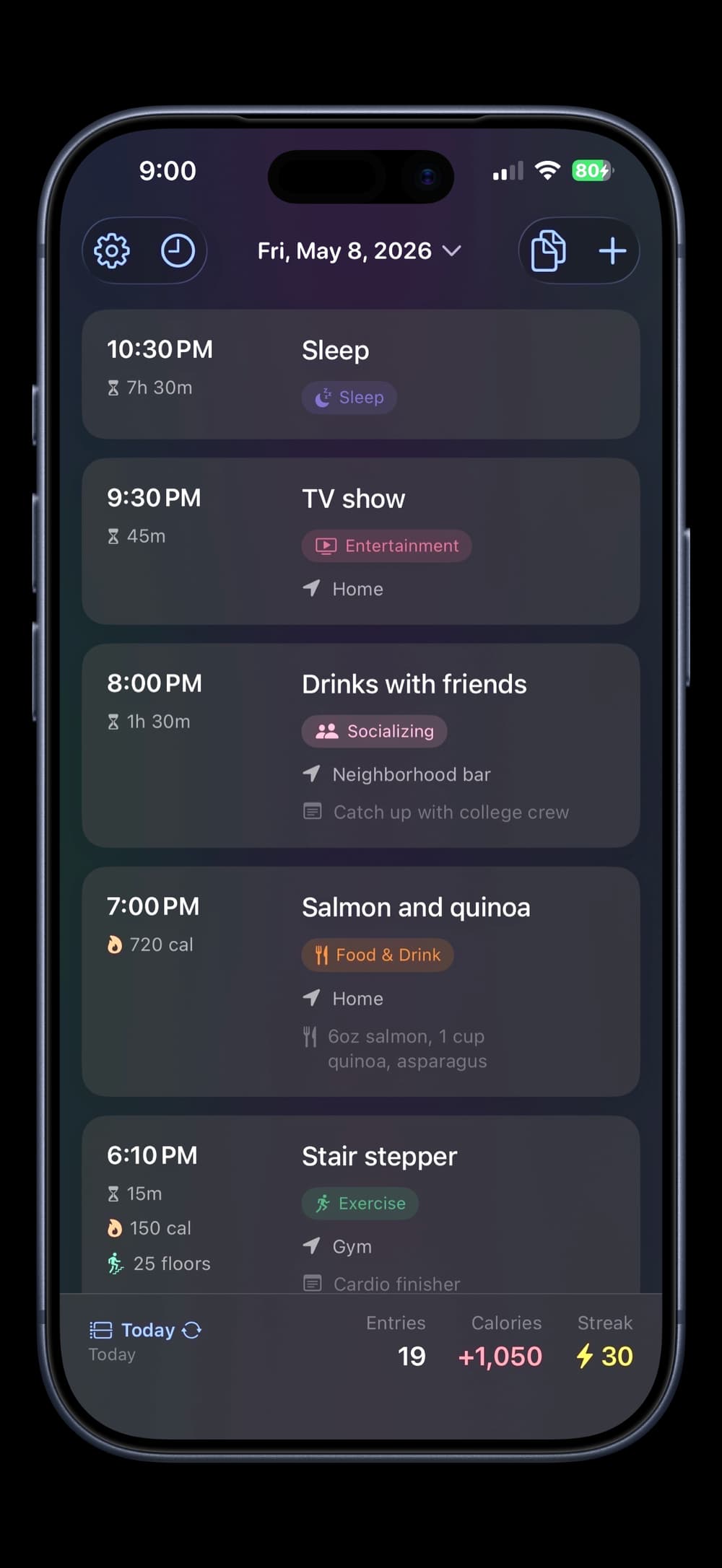
Type “chicken caesar salad” or “30-minute morning run” — Loggnit Pro estimates the calories. Body metrics personalize the math, leaning conservative on purpose.
See patterns with 7-day or 30-day line charts — on-device, instant, free. Workouts and meals go to Apple Health, and your body metrics come back from it.
Your entries live on your device and sync through private iCloud — start on iPhone, continue on iPad. No tracking, no ads.
Free with unlimited entries and all 16 built-in categories. Loggnit Pro adds AI estimates, custom categories, and Copy Day — one-time $7.99.
Screenshots
Features
16 built-in categories
Body
Food & Drink, Water, Exercise, Lift, Sleep
Focus
Deep Work, Meetings, Screen Time
Mind
Reading, Learning, Mindfulness, Self Care
Life
Entertainment, Socializing, Hobby, Errands
Track in detail
Entries
Category, duration, calories, location, and notes
Metrics
Sets, reps, weight, distance, and floors
Three views
Chronological, by time of day, or by category
Trend charts
7-day and 30-day, one line per category
Log by voice
Siri, Spotlight, and Shortcuts
Hands-free, without opening the app
Log by name
Water, food, a lift, or a workout
Sets by voice
Siri asks your reps and weight
Home-screen widget
Tap Food, Lift, or Exercise for a pre-filled entry
Pricing
Free
Unlimited entries, 16 categories, charts, Apple Health & iCloud sync, widgets, streaks, stats
Loggnit Pro — $7.99 one-time
AI calorie estimates (20/day), body metrics, custom categories, Copy Day, Family Sharing
FAQ
What is Loggnit?+
Loggnit logs anything you do — meals, workouts, work, sleep, habits — in seconds. AI handles the calorie math; charts surface patterns in your week. Free on iPhone and iPad.
What can I track?+
Anything. Entries can include a category, duration, calories, location, notes, and metrics like sets, reps, weight, distance, and floors. Loggnit ships with 16 built-in categories — Food & Drink, Water, Exercise, Lift, Deep Work, Meetings, Screen Time, Reading, Entertainment, Sleep, Socializing, Learning, Self Care, Mindfulness, Hobby, and Errands. Pro users add unlimited custom categories with their own icons and colors.
Can I log with Siri or Shortcuts?+
Yes. Loggnit works hands-free — say “Hey Siri, log a 30-minute run” or “log water in Loggnit” and it's saved without opening the app, through Siri, Spotlight, or the Shortcuts app. Food, Lift, Exercise, and Water each capture the right details: for a Lift entry, Siri will even ask your reps and weight, while a simple log like Water saves straight away with no follow-up questions. You can build your own Shortcuts and automations too, or tap Food, Lift, or Exercise on the home-screen widget to open a pre-filled entry.
Can I track water?+
Yes — Water is a built-in category set up for one-tap logging. Pick Water and the entry is ready to save: the name fills in for you, and there's no calorie field to fuss with. Add an amount when you want one — “16 oz”, “1 glass” — or just save and move on.
Can I log strength training in detail?+
Yes. Lift entries log each set's reps and weight independently, so pyramids, drop sets, and working-up patterns log accurately. Adding a set pre-fills from the previous one, so straight sets like 5×5 stay fast. Up to 20 sets per entry. Total volume and the full session shape feed into AI calorie estimates and your daily, weekly, and monthly stats.
Can I log cardio in detail?+
Yes. Distance-based exercises (runs, walks, rides) record distance with pace auto-calculated. Stair sessions track floors with cadence (steps per minute) shown live. Use the built-in stopwatch to time any activity as it happens. All metrics flow into your stats.
How does calorie tracking work?+
Loggnit calculates net calories automatically — food and drink add, exercise subtracts. Type the count yourself, or with Loggnit Pro, tap AI Estimate and let AI handle the math. Estimates lean conservative — slightly high on food, slightly low on exercise — so the math reflects reality, not flattery.
How do AI calorie estimates work?+
Type a meal or activity description, tap AI Estimate, and Loggnit returns a number in seconds. Body metrics personalize the math, so a sedentary office worker and a competitive cyclist get different numbers from the same meal. 20 estimates per day per Pro user. Each request sends only the activity, category, notes, and any metric values you entered, plus your body metrics; it isn't stored on our servers and never trains a model.
Does Loggnit work with Apple Health?+
Yes, two ways. Loggnit writes workouts (Lift and Exercise) and food entries to Apple Health so your Activity rings stay accurate. It can also pull weight, height, biological sex, and birth year from Health to skip manual entry. Opt-in — toggle it on in Settings → Apple Health.
How are entries organized?+
You can view your day three ways: chronologically, grouped by time of day (morning, afternoon, evening, night), or grouped by category. Switch between views instantly with one tap.
Can I see my patterns over time?+
Yes. Switch the stats card to 7-day or 30-day and a line chart appears beneath your totals — one line per category, traced day by day. Tap any chip to isolate a category; tap several to compare. On-device, instant, free.
Does it track location?+
Yes — opt-in. Enable Auto-add Location in Settings and Loggnit attaches your current location to new entries automatically. It stays approximate by default, just your neighborhood. Turn on Use Precise Location for street-level addresses, and Use Place Names (on by default) records where you were by name — “Planet Fitness” instead of the street address — when you’re right there. Addresses and place names come from Apple Maps; your location never reaches our server. You can also add or edit locations manually.
Can I duplicate entries?+
Yes. Swipe right to duplicate; on iPad, tap the duplicate icon on each card. Both create a copy at the current time. Pro users unlock Copy Day, which duplicates a full day's entries to another date in one tap — great for recurring routines.
How much does it cost?+
Loggnit is free with unlimited entries and all 16 built-in categories. Upgrade to Loggnit Pro for a one-time $7.99 to unlock AI calorie estimates, body metrics personalization, custom categories, and Copy Day. No subscriptions.
Do I need to create an account?+
No. Download and start tracking immediately. No signup, no email, no password.
Is my data private?+
Your entries are stored locally on your device and sync through your private iCloud account — no tracking, no analytics. At launch the app opens an anonymous session with our backend, used only to authenticate and rate-limit AI requests; it carries no name, email, or location. AI Estimate is opt-in: each request sends only what that one estimate needs through our proxy to SpaceXAI, isn't stored on our servers, and never trains a model.
Does it work offline?+
Yes. Create and view entries offline; everything syncs automatically via iCloud when you reconnect. AI calorie estimates require an internet connection — they're the only feature that does.
Guides
Version 1.5.2