
Aquavail
Hot Tub & Pool Care
Know exactly what to add to your water, every time. Set up your hot tub, pool, swim spa, or cold plunge with your exact specs, and Aquavail turns each test into step-by-step dosing built for your setup.


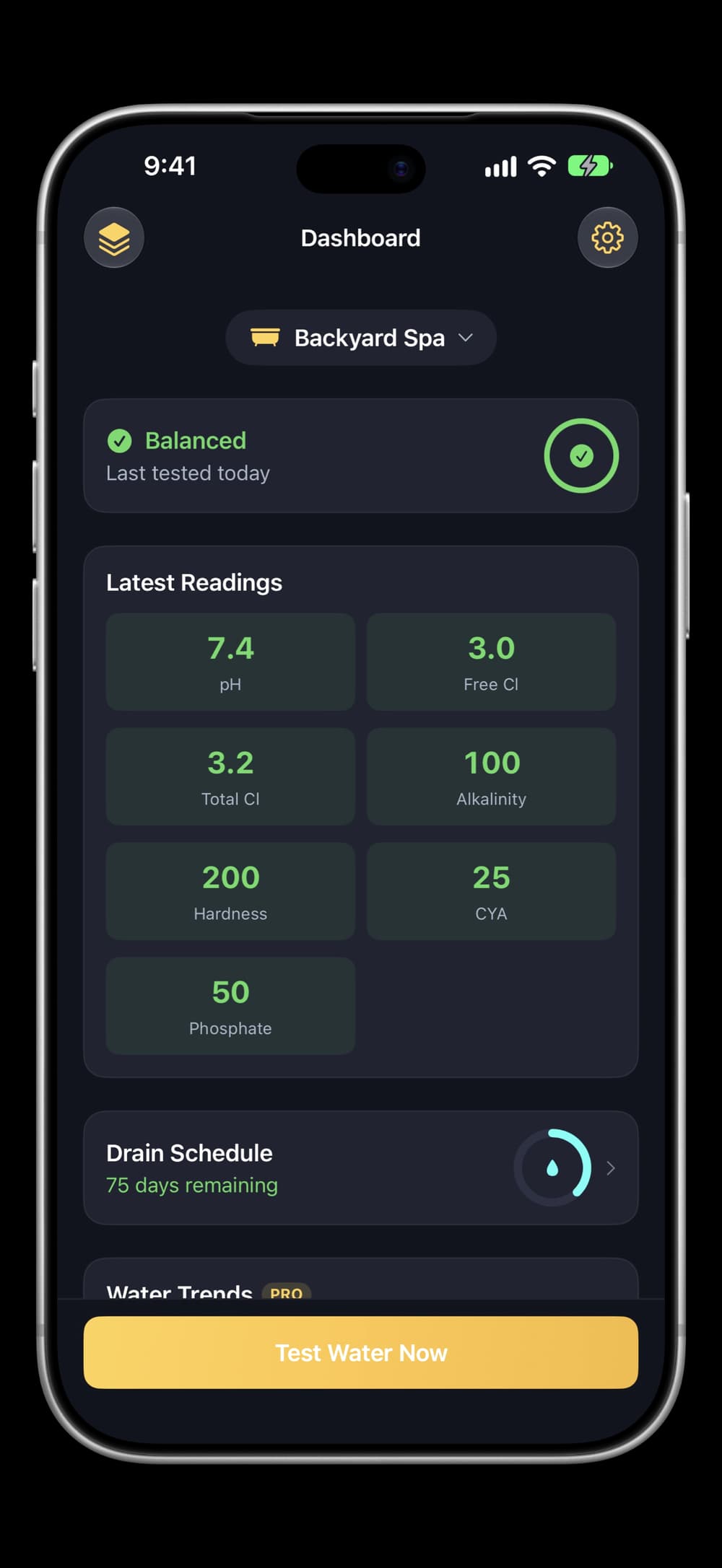
Enter your test strip readings and water condition; get step-by-step recommendations in chemistry order with explicit wait timing between chemicals.
Supports six sanitizer types with context-aware ideal ranges, phosphate testing, chloramine detection, and four-tier water status. Drain refills get source-aware First-Fill Chemistry.
Pro unlocks AI that learns from your test history. On iPad, turn sideways to see every tub beside the dashboard. Free to download, no account required.
Screenshots
Features
What it does
Precise dosing
Tailored to your exact setup
Chemistry order
Step by step, with wait times between chemicals
Six sanitizer types
Each with its own ideal ranges
Phosphate testing
Plus chloramine detection
Four-tier water status
Balanced, Fair, Adjust, or Urgent at a glance
First-Fill Chemistry
Startup dosing after a drain, by water source
Ask Siri
Water status by voice
What’s out of range, and when to drain next
Drain and refill
Log it by voice to reset your timeline
Siri, Spotlight, and Shortcuts
Asks which tub when you have several
On iPad
Tubs beside the dashboard
Turn sideways to see each tub’s latest status
One tap to switch
Or add a new tub without leaving the list
Details and recent tests
From the info button on each tub’s card
Pinned controls
Add Tub or Pool and the care tip, always visible
Pricing
Free
Full rule-based dosing and all core features
Pro — $9.99 one-time
AI that learns from your test history, trend analysis, Family Sharing
FAQ
What is Aquavail?+
Aquavail is a water chemistry app that gives you personalized dosing recommendations for your hot tub, pool, swim spa, or cold plunge. Enter your test strip readings, report what you see and smell, and get step-by-step guidance tailored to your exact setup.
What water body types are supported?+
Hot tubs, pools, swim spas, and cold plunges. Ideal ranges for chlorine, salt, CYA, and pH adjust automatically based on your tub type. Drain schedules, temperature ranges, and chemistry targets are all tub-specific.
What sanitizer types are supported?+
Chlorine, bromine, salt systems, mineral cartridges (e.g., FROG), ozone, and UV+ozone. Each gets the right products, dosing amounts, shock type, and ideal ranges.
What can I test?+
Enter readings for pH, free chlorine, total chlorine, bromine, alkalinity, calcium hardness, cyanuric acid, salt, and phosphate — filtered by your sanitizer type. You also report water condition: clarity, foam, smell, color, and deposits.
Does it work on iPad?+
Yes. Turn the iPad sideways and your tubs appear in a sidebar beside the dashboard, each showing its latest water status. Tap one to switch the dashboard to it, add a new tub without leaving the list, or open a tub's details and recent tests from the info button on its card. The Add Tub or Pool button and a care tip stay pinned below the list as it scrolls. Portrait and the iPhone layout are unchanged.
Can I check my water with Siri?+
Yes. Ask Siri for your tub's status and it tells you whether the water is balanced, what's in or out of range, when you last tested, and when your next drain is due — without opening the app. You can also log a drain and refill by voice to reset your maintenance timeline. Both work through Siri, Spotlight, and the Shortcuts app, and when you have more than one tub Siri asks which one.
How do recommendations work?+
Enter your test strip readings and water condition. Aquavail calculates exact chemical amounts scaled to your water volume — teaspoons for spas, cups, or pounds for pools — and presents them in chemistry order with explicit wait timing between chemicals so you know when to add the next one. Pro users get AI recommendations that reference your previous test for smarter follow-up advice.
How does sequenced timing work?+
When multiple chemicals need to be added, Aquavail puts them in the correct order — alkalinity before pH, salt before chlorine — and tells you exactly how long to wait between each one. No more guessing whether the previous chemical has finished circulating or whether you can add the next product yet.
What do the status labels mean?+
Balanced means all readings are in range and water looks good. Fair means readings are fine but water condition has minor issues. Adjust means one or two readings need correction. Urgent means multiple readings are off, a dangerous reading was detected, or water condition is severe.
How does drain tracking work?+
Aquavail estimates your drain schedule based on tub type, water volume, and usage frequency. When it's time, you get pre-drain prep tips tailored to your tub type plus approximate First-Fill Chemistry that adjusts for your fill water source — city, well, softened, or reverse osmosis each get different baseline assumptions. Tap "Drained & Refilled" after a drain to reset the schedule and save your fresh baseline.
What's First-Fill Chemistry?+
After a drain and refill, Aquavail calculates approximate startup dosing for your fresh water. The recommendations adjust for your fill source — city water uses typical baselines, well water often skips alkalinity and hardness (often already high), softened and RO water need more of both, and unknown sources prompt you to test before adding anything. Each source also gets a tailored caveat — for example, well water users get metal-sequestrant guidance.
Can I manage multiple tubs?+
Yes. Add as many hot tubs, pools, swim spas, or cold plunges as you need and switch between them from the dashboard or test screen.
How much does it cost?+
The free version includes full rule-based dosing for all tub and sanitizer types. Pro is a one-time $9.99 purchase — no subscription, no recurring charges. Includes Family Sharing.
What does Aquavail Pro include?+
Pro unlocks AI-powered recommendations that learn from your test history, plus history trend analysis that spots patterns across your test data over time. AI is optional — toggle it off in Settings any time. All other features — dosing calculations, water status, drain tracking, phosphate testing, First-Fill Chemistry, and multiple tub management — are free for everyone.
Why do AI recommendations differ from standard ones?+
Standard recommendations follow fixed dosing formulas based on your current readings. AI recommendations consider additional context — your previous test results, what was recommended last time, water condition patterns, and your specific usage habits. This means the AI may suggest different amounts, additional products, or preventive steps that the standard system doesn't.
Do I need to create an account?+
No signup, no email, no password. Start testing immediately after adding your first tub.
Is my data private?+
Your tubs and test history stay on your device — no cloud sync, no signup, no password. At launch the app opens an anonymous session with our backend, used only to authenticate and rate-limit AI requests; it carries no name, email, or location. When Pro users generate AI recommendations, test readings and tub configuration are sent through that secure proxy to SpaceXAI for processing — never personal information. AI is optional and can be turned off in Settings.
Does it work offline?+
Yes. Enter tests, view recommendations, and track drain schedules without an internet connection. AI recommendations automatically fall back to rule-based dosing when offline.
Guides
Version 1.4.0