
Qaravo
Gen Z Slang Translator
Qaravo is an iMessage extension that takes the message you were about to send and rewrites it in the voice of whoever you're texting — so it lands the way you meant it.


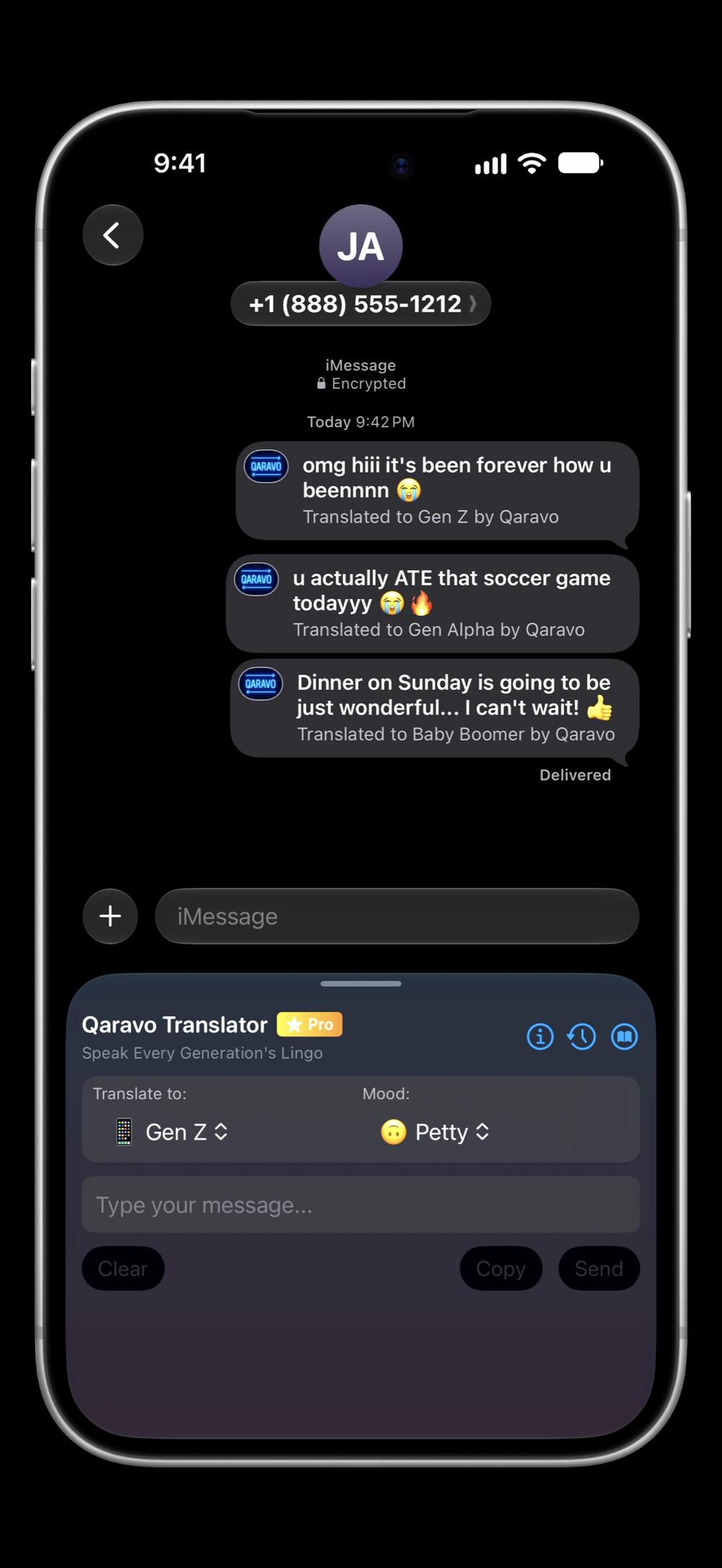
Choose from Gen Alpha to Baby Boomer, set the mood — Friendly, Professional, Chill, Sarcastic, Romantic, Hype, Hustle, or Petty — and send translations directly in your conversations.
Powered by AI with text-to-speech and an in-app Generation Guide with facts that refresh daily. Free to start with 5 daily translations and a free sample of every Pro mood; a one-time Pro upgrade unlocks up to 500 translations a day, all 8 moods, auto-translate, and extended history. No subscription, no account required.
Screenshots
Features
Translate
Generational translation
Reads like their texts, down to the emoji
Generation Guide
Slang and context, with facts refreshed daily
Try every Pro mood
Once each, free, before you buy
Report a result
Flag any translation or guide entry to us
Everyday use
Inside iMessage
On iPhone and iPad
Text-to-speech
Hear any translation in several voices
History
10 translations free, 100 with Pro
Auto-translate
Translates as you type (Pro)
Generations
- Gen Alpha
- Gen Z
- Millennial
- Gen X
- Baby Boomer
Moods
- Friendly
- Professional
- Chill
- Sarcastic
- Romantic
- Hype
- Hustle
- Petty
Pricing
Free
5 daily translations, 4 moods, 10-item history, plus a free taste of every Pro mood
Qaravo Pro — $4.99 one-time
Up to 500 translations a day, all 8 moods, auto-translate, 100-item history, Family Sharing
FAQ
What is Qaravo?+
Qaravo is an iMessage extension that translates your messages between generational slang styles — Gen Alpha, Gen Z, Millennial, Gen X, and Baby Boomer — with mood options like Friendly, Professional, Romantic, and Sarcastic, so you can communicate naturally across age gaps.
How does it work?+
Install Qaravo, then use it directly in iMessage. Type your message, select a generation and mood, then translate. Send the result straight into your conversation or copy it to use anywhere. No app switching needed.
Can I report a translation?+
Yes. Tap the flag on any translation or Generation Guide entry, pick a reason, and your email app opens a draft to us. The report holds only that result: what you typed, what Qaravo wrote, and the generation and mood. Qaravo never sees the rest of your conversation.
Can I try Pro moods before buying?+
Yes. Every free user gets a one-time free sample of each Pro mood — Romantic, Hype, Hustle, and Petty. Your first translation with each is free; after that, unlock them for good with Qaravo Pro.
What is the Generation Guide?+
A built-in reference that explains the slang, communication style, and cultural context behind each generation. Its facts refresh automatically once a day, and you can reroll them yourself up to three times a day for free, and a refresh that fails doesn't count. Pro removes the limit.
What generations are supported?+
Gen Alpha (2010–2024), Gen Z (1997–2009), Millennial (1981–1996), Gen X (1965–1980), and Baby Boomer (1946–1964). Gen Alpha's range closed in 2024 now that Gen Beta has begun.
Does it work on iPad?+
Yes. Qaravo works on both iPhone and iPad in iMessage.
Does it need an internet connection?+
Translating does, because each translation goes to the AI. Offline, Qaravo says so right away instead of waiting, and the notice clears by itself when you reconnect. The Generation Guide keeps showing the facts it already has, and your history stays on your device. If a translation is slow on a weak connection, tap Cancel beside Translating… to stop it.
Can I use it outside iMessage?+
You can copy translations to use anywhere — texts, emails, social media, or any other app. The extension is optimized for iMessage.
What moods are available?+
Free users get four moods: Friendly, Professional, Chill, and Sarcastic. Pro unlocks all eight, adding Romantic, Hype, Hustle, and Petty — the LinkedIn-thought-leader Hustle and the politely passive-aggressive Petty. Every free user can try each Pro mood once before upgrading.
What is auto-translate?+
With Pro, your message translates automatically as you type — no need to tap a button. You can switch it on or off anytime from Qaravo's Info screen.
Can I hear translations read aloud?+
Yes. Qaravo includes text-to-speech with multiple voice options. Tap the speaker icon to hear any translation spoken aloud and choose your preferred voice.
Does Qaravo save my translations?+
Yes. Translation history is stored on your device. Free users can save up to 10 translations; Pro unlocks 100.
How much does it cost?+
Qaravo is free to download with 5 translations per day and a 10-item history. Qaravo Pro is a one-time $4.99 lifetime purchase for up to 500 translations a day, all 8 moods, auto-translate, 100-item history, and Family Sharing.
Is Pro a subscription?+
No. Qaravo Pro is a one-time purchase of $4.99. Pay once, keep it forever.
Is my data private?+
The message you typed, the generation, and the mood are sent securely through our backend proxy to SpaceXSI's Grok model for translation and aren't stored on our servers; SpaceXSI keeps API requests for 30 days to monitor for abuse, then deletes them, and does not train on them. Before your first translation, Qaravo asks in a short consent alert; the AI Translation toggle under Info changes it later. Opening Qaravo in Messages starts an anonymous session with that proxy even before then, used only to authenticate and rate-limit requests; it carries no name, email, or location. Your history stays on your device. No account, no tracking, no ads.
Guides
Version 3.4.1